The first time I built a vertical reel feed I reached for the obvious tools.
UITableView. Pre-fetching. Cell reuse. The implementation worked, but it
felt overbuilt — there were always exactly two or three cells on screen at
once, and the table view's machinery was doing a lot of bookkeeping I didn't
actually need.
The second version is what this post is about. Three view controllers. A
single UIScrollView with paging. A content size that never changes — three
screens, forever. The user can scroll for as long as they like; only three
reel pages ever exist. As they move through the feed, the same three physical
objects shift positions and get reconfigured with new content.
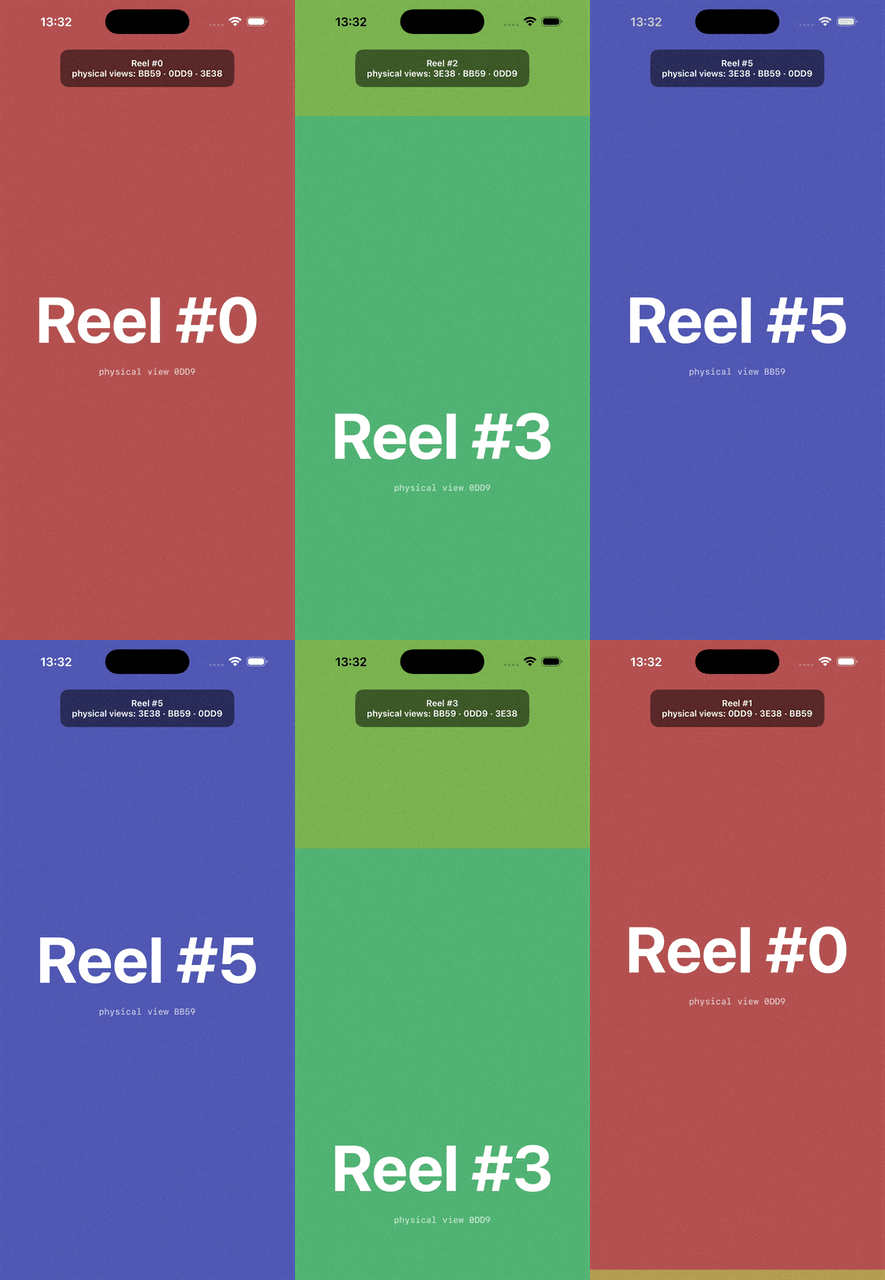
Top overlay lists the ids of the three physical pages. Scroll through ten reels and the same three ids permute — no fourth id ever appears.
Full source on GitHub: Olya-Yer/reel-scroll-view.
The intuition
At any moment in a reel feed, exactly one reel is fully visible. During a swipe, one is leaving and one is arriving. So at most three reels are on screen at once. Why hold more?
Once you've accepted "only three need to exist," the next question is how to arrange them inside a scroll view so that:
- The user can swipe up or down freely.
- The next reel they see is always the right one, with no jump or flicker.
- The scroll view never grows — no contentSize fighting, no jumping the offset to absurd values to fake an infinite feed.
The answer is a paged UIScrollView with contentSize.height = 3 × pageHeight,
the three pages laid out at slots 0, 1, 2, and the current reel always
sitting in the middle slot at contentOffset = pageHeight.
  ┌─────────────┐  ← slot 0  (previous reel)
  │  Reel #2    │
  ├─────────────┤  ← slot 1  (current reel, contentOffset = pageHeight)
  │  Reel #3    │
  ├─────────────┤  ← slot 2  (next reel)
  │  Reel #4    │
  └─────────────┘
When the user lands on slot 0 or slot 2, the controller recycles — discards the page on the far side of the feed, shifts the remaining two pages over, reuses the discarded page object at the now-empty slot with new content, and snaps the offset back to the middle. The user perceives infinite scrolling; the scroll view sees three pages, period.
The setup
The scroll view is configured once and never resized:
private let scrollView = UIScrollView()

override func viewDidLayoutSubviews() {
    super.viewDidLayoutSubviews()
    scrollView.frame = view.bounds
    scrollView.contentSize = CGSize(
        width: view.bounds.width,
        height: 3 * view.bounds.height
    )
    // ...
}

private func setupScrollView() {
    scrollView.isPagingEnabled = true
    scrollView.bounces = false
    scrollView.showsVerticalScrollIndicator = false
    scrollView.contentInsetAdjustmentBehavior = .never
    scrollView.delegate = self
}
isPagingEnabled = true is what makes the snap work. Every drag lands on
exactly one of slot 0, 1, or 2 — no in-between states.
The three pages are loaded as children:
private func loadInitialPages() {
    for slot in 0..<3 {
        let reelIndex = currentReelIndex - 1 + slot
        let page = ReelPageViewController(reelIndex: reelIndex)
        attach(page, atSlot: slot)
        pages.append(page)
    }
}

private func attach(_ page: ReelPageViewController, atSlot slot: Int) {
    addChild(page)
    scrollView.addSubview(page.view)
    page.view.frame = CGRect(
        x: 0, y: CGFloat(slot) * pageHeight,
        width: view.bounds.width, height: pageHeight
    )
    page.didMove(toParent: self)
}
And the initial offset is set to the middle slot — so the user always starts in a symmetric "current in the middle, prev above, next below" state:
scrollView.setContentOffset(CGPoint(x: 0, y: pageHeight), animated: false)
Detecting the landing slot
Because paging snaps to whole pages, scrollViewDidEndDecelerating always
fires with the offset at an exact multiple of pageHeight. Which slot the
user landed in is one rounded division:
extension ReelScrollViewController: UIScrollViewDelegate {
    func scrollViewDidEndDecelerating(_ scrollView: UIScrollView) {
        let slot = Int(round(scrollView.contentOffset.y / pageHeight))

        switch slot {
        case 2: currentReelIndex += 1; recycleDown()
        case 0: currentReelIndex -= 1; recycleUp()
        default: break // settled in the middle — nothing to do
        }
    }
}
That's the entire scroll-event integration. No frame intersections, no scroll direction tracking, no velocity heuristics. The paging system has already done all the work; we just look at where it stopped.
The recycle
This is the heart of the trick. When the user lands on slot 2 (scrolled down), the page that was in slot 0 is now two reels behind — we don't need it. The page in slot 1 was previously current and is now previous. The page in slot 2 is current. We need a fresh "next" below the new current.
The cheap way is to allocate a new view controller. The cheaper way is to take the page falling off the front and re-purpose it:
private func recycleDown() {
    // The page in slot 0 falls off the front of the queue.
    let recycled = pages.removeFirst()

    // Shift the remaining two pages up by one slot.
    for page in pages {
        page.view.frame.origin.y -= pageHeight
    }

    // Repurpose the recycled page as the new bottom slot with new content.
    let newReelIndex = currentReelIndex + 1
    recycled.view.frame = CGRect(
        x: 0, y: 2 * pageHeight,
        width: view.bounds.width, height: pageHeight
    )
    recycled.configure(forReelIndex: newReelIndex)
    pages.append(recycled)

    // Reset the scroll offset to the middle slot so the just-scrolled-to
    // page (now in slot 1) stays under the user.
    scrollView.setContentOffset(CGPoint(x: 0, y: pageHeight), animated: false)
}
recycleUp is the mirror image — drop the last page, shift down, prepend a
fresh-but-actually-reused page at slot 0.
The two lines that make the whole illusion work are the last two:
configure(forReelIndex:) swaps content into the existing object, and
setContentOffset(...) puts the scroll view back into its symmetric "current
in the middle" resting state. Both happen synchronously, with animated: false,
in the same runloop tick the deceleration ended — so the user never sees a
jump.
What configure does in a real app
In the demo, configure(forReelIndex:) just changes a background colour and
two labels:
func configure(forReelIndex newReelIndex: Int) {
    reelIndex = newReelIndex
    refresh()
}
In a real app — TikTok, Reels, Shorts — this is where the video URL gets swapped
into the AVPlayer that the page already owns. The player instance is
reused. Three players for the whole feed, regardless of how many reels the
user scrolls through. That's the real prize: video player setup is expensive
(decoder warm-up, buffer allocation, first-frame latency), and keeping three
warm players is what makes the feed feel instant.
In the demo I prove the reuse with a physical view XXXX label that's
assigned once per ReelPageViewController and never changes. The overlay at
the top lists the three current ids. Scroll through ten reels and the same
three ids permute through the slots — no fourth id ever appears.
A few honest notes
A few things worth being upfront about:
-
The first reel is asymmetric. The demo's initial state puts a reel at index
-1in slot 0 — a "previous" reel that the user can scroll up to but never asked for. In a real app you'd either pre-cache the previous reel too (so the first swipe-up is also instant), or treat the very first reel as a boundary and disable the upward direction until the user has scrolled past it. Either is a few lines. -
scrollViewDidEndDeceleratingis the right hook, but if the user flicks hard, multiple slots can pass under their finger before deceleration ends. The hook fires once at the final resting place; the controller recycles one slot's worth of work, even if the user crossed two. That's fine for video feeds (you only ever play the reel they actually stopped on) but worth knowing if you adapt this for something where every transition matters. -
The recycle happens inside the delegate callback, which runs on the main thread synchronously with the scroll deceleration end. If
configure(forReelIndex:)is heavy (e.g., a synchronous player setup), you'll see a hitch. Keepconfigureto property assignments and dispatch the heavy work asynchronously.
Why I like this pattern
It's the second time recently I've watched a problem dissolve into a smaller problem the moment I named the invariant out loud. With sticky headers it was every header needs to know about every other header. Here it's at any moment, three reels is enough.
Once that's the invariant, the implementation almost writes itself: three pages, three slots, paged scrolling, snap back to the middle. The hard parts of an infinite feed — prefetching, recycling, smooth transitions — fall out of the geometry instead of needing their own subsystems.
Code: Olya-Yer/reel-scroll-view on GitHub — the scroll controller, the page view, and an Xcode project ready to clone and run.