The inspiration was the iOS Calendar app. Open it in week view and watch the headers: the month label sits at the top, the current day's header slides in under it, and when you scroll into a new month the new month's label slides on top of the old one in one continuous motion. Multiple sticky layers, ordered by what's currently on screen, choreographed so nothing ever overlaps or pops. That's the behaviour I wanted.
The technical jumping-off point was Swift Talk episode #333 — Sticky Headers
for Scroll Views.
Chris and Florian build the foundation: a GeometryReader inside a named
coordinateSpace, a PreferenceKey that broadcasts every header's frame up to
the ScrollView, an isSticking check that's just frame.minY < 0, and an
offset that pushes a header up when the next one approaches. One sticky layer
at a time. Watch it first if you want the gentle introduction — it's 25
minutes well spent.
This post is about the next layer up: making multiple headers stack, letting
some hide on scroll while others stay pinned, getting the push-off math right
when there's already a stack of pinned headers above, and handing all of it
through the view tree without the caller having to pass arrays of CGRects
around.
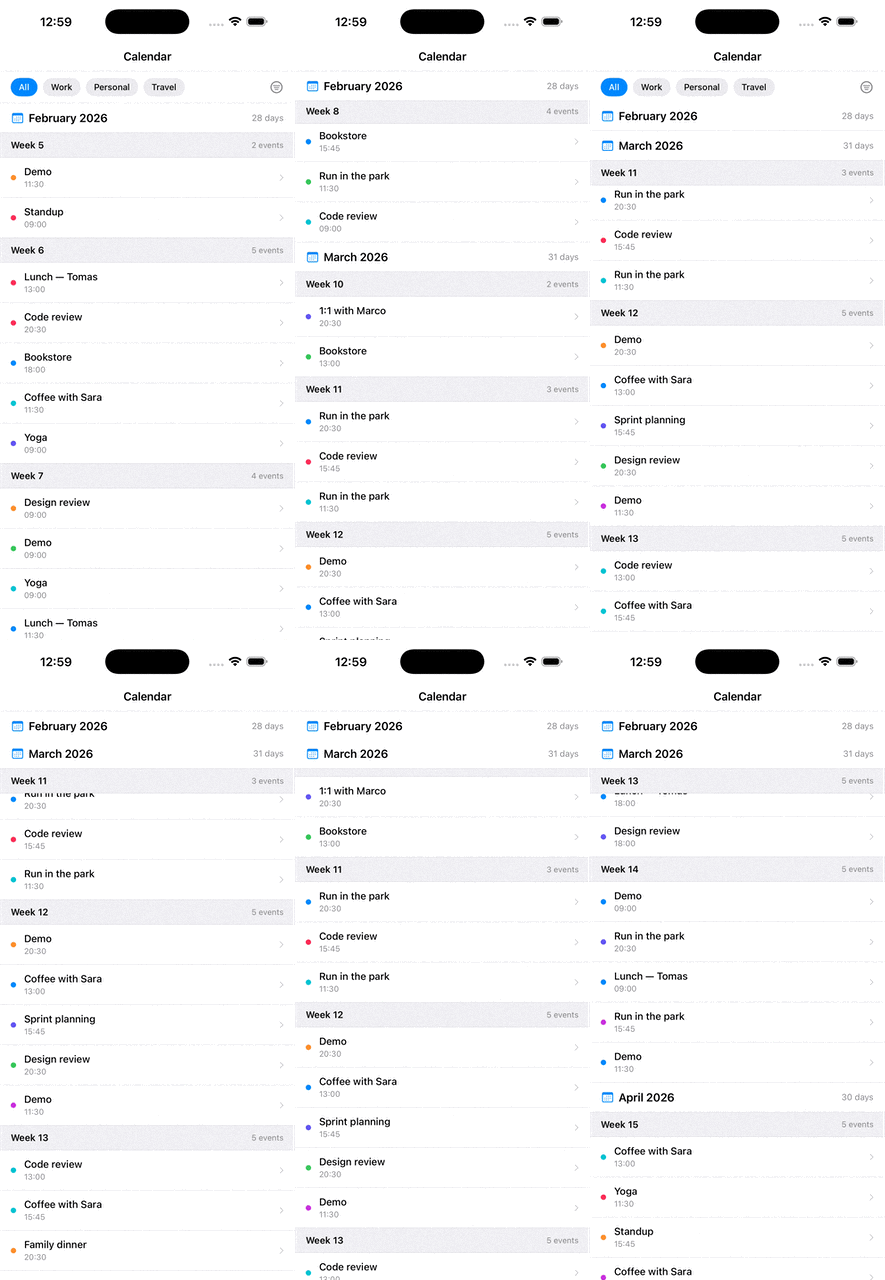
All three modes together: filter bar (reverse), month headers (fixed, stacking), weeks (regular, pushing each other off).
The full source for the modifier and the calendar demo lives on GitHub: Olya-Yer/sticky-headers-swiftui.
Why not LazyVStack?
SwiftUI ships with LazyVStack(pinnedViews: [.sectionHeaders]), and on day one
it feels like the answer. By day three you've usually outgrown it:
- You can pin one layer of headers, not a hierarchy.
- You can't make a header hide on scroll and slide back in.
- You can't mix "always pinned" with "pinned until something else takes over."
- Section headers want to know about each other, and
LazyVStackdoesn't tell them anything.
I needed all four. So I wrote my own — about 250 lines of view modifier — that supports four modes per header:
- Regular sticky — sticks at the top, then gets pushed off when the next sticky arrives, with the next header's top glued to its bottom until it slides out.
- Fixed (
isFixed: true) — stays pinned forever. Multiple fixed headers stack in the order they reach the top. - Reverse (
isRevers: true) — hides on scroll up, reveals on scroll down. - Opt-out (
isSeeMore: true) — looks sticky-eligible but never actually sticks.
The API first
The caller writes two things. At the ScrollView root:
ScrollView(.vertical, showsIndicators: false) {
    VStack(spacing: 0) {
        // content
    }
}
.useStickyHeaders()
And on each header that should stick:
monthBar
    .background(Color.white)
    .sticky(lastItemY: lastItemY, isFixed: true)
    .zIndex(100)
No coordinator, no view model, no UIScrollViewDelegate. The zIndex at the
call site is how the caller controls which sticky renders on top when two
overlap — more on that further down.
How the pieces talk to each other
The hard part of multi-header sticking is that every header needs to know about every other header. Header A can't compute its own offset without knowing whether Header B is currently pinned above it — and Header B is two levels up the view tree.
In the Swift Talk episode the array of frames is collected at the ScrollView
root and passed back into .sticky([CGRect]) explicitly by the caller. That
works for a demo. It gets ugly fast when the headers are generated inside a
ForEach deep in some child view, or when the caller shouldn't need to know
that frames exist at all.
So I closed the loop with Environment. PreferenceKey moves frames up the
tree exactly as before; Environment moves the merged dictionary back down.
The caller writes .sticky(...) and .useStickyHeaders() and never touches
the frame array.
each header  ──preference──►  ScrollView root  ──environment──►  each header
       │                                                                │
       │                                                                ▼
       │                                                    reads neighbours,
       │                                                    computes own offset
       ▼
   broadcasts its
   frame + flags
The preference key carries a dictionary keyed by Namespace.ID, so every
header has a stable identity without the caller assigning IDs:
struct FramePreference: PreferenceKey {
    static var defaultValue: [Namespace.ID: StickyRect] = [:]

    static func reduce(value: inout Value, nextValue: () -> Value) {
        value.merge(nextValue()) { $1 }
    }
}
The reduce step is the quiet hero. As SwiftUI walks up the view tree, every
header contributes its single-entry dictionary, and merge glues them all
into one. By the time the dictionary reaches the root, it contains the live
frame and config of every sticky header on screen.
The root then pushes the merged dictionary back down through Environment:
struct UseStickyHeaders: ViewModifier {
    static let container = "stickyContainer"
    @State var frames: [Namespace.ID: StickyRect] = [:]

    func body(content: Content) -> some View {
        content
            .onPreferenceChange(FramePreference.self) { newValue in
                DispatchQueue.main.async {
                    frames = newValue
                }
            }
            .coordinateSpace(name: UseStickyHeaders.container)
            .environment(\.stickyRects, frames)
    }
}
Two details here:
- The
DispatchQueue.main.asynchop is not cosmetic. Writing to@Statefrom inside a preference callback during the same render pass triggers SwiftUI's "modifying state during view update" warning — and on iOS 17+, sometimes a crash. Punt the write to the next runloop tick. - The
coordinateSpace(name:)is what lets each header read its frame relative to the scroll container, not the screen.
Detecting scroll direction
Once a header has its own frame and the dictionary of everyone else's frame, direction comes almost for free:
.onChange(of: f) { newFrame in
    isScrollingUp = newFrame.minY > frame.minY
    scrollAmount = newFrame.minY - frame.minY
    frame = newFrame
}
If newFrame.minY is greater than the last frame's minY, the view moved
down visually, which means the user scrolled up. That single boolean
drives the hide/show animation for reverse headers.
No UIScrollView.contentOffset, no delegate, no GeometryReader chasing the
scroll view itself. Each header just watches its own frame.
Pushing each other off
This is the bit I want to spend the most time on because it's where the Swift Talk formula starts to bend once you have more than one sticky layer.
In the episode, regular stickies sit at y = 0 and the push reads as:
if let other = stickyRects.first(where: {
    $0.minY > frame.minY && $0.minY < frame.height
}) {
    o -= frame.height - other.minY
}
The condition says another header has scrolled to within my own height of the
container top — i.e., it's about to overlap me. The amount says push me up
by however much of my height the next header has already eaten into. As the
next header arrives at minY = 0, the push reaches frame.height and I'm
fully gone.
That formula carries an invisible assumption: my sticky position is y = 0.
The whole calculation is measured against the container top. The moment you
put a row of fixed pinned headers above me — a year header, a month header,
a filter bar — my actual sticky position is no longer the container top.
It's fixedHeadersHeight below the container top. And then the formula
fires far too late.
Concretely: if Feb and March are both pinned above the regular weeks,
fixedHeadersHeight = 90. My weekly headers actually stick at y = 87.
For the next week to push me out, its top needs to enter the band from
y = 87 to y = 117 (top of my stick position to its bottom). The original
condition other.minY < frame.height only fires below y = 30 — by which
point the next header is already sitting on top of mine with no push having
happened.
The fix is to read the formula in terms of my stick region, not the container's top:
let stickRegionBottom = fixedHeadersHeight + frame.height
if let other = stickyRects.first(where: { (key, value) in
    key != id
    && value.rect.minY > frame.minY
    && value.rect.minY < stickRegionBottom
}) {
    o -= stickRegionBottom - other.value.rect.minY
}
Same shape, just measured against where I actually live on screen. When
fixedHeadersHeight = 0 this collapses to the original — single-layer scenes
behave identically. With a fixed stack above, the next header's top stays
glued to my bottom from the moment it enters my stick region until I'm
fully pushed off.
Stacking fixed headers
For the fixed mode, the question is who came first. Two pinned headers both
need to live at the top, but the second one needs to stick to the bottom of
the first, not to zero. So isSticking becomes:
var isSticking: Bool {
    frame.minY < fixedHeadersHeight
}
And fixedHeadersHeight figures itself out from the live dictionary. The
order is implied by which neighbours are currently sticking, not by the static
view hierarchy — so a header can correctly slot under whatever's already
pinned even when the view tree gives no ordering hints:
let previousFixedHeaders = stickyRects?
    .filter { item in
        guard item.key != id && item.value.isFixed else { return false }

        let selfMinY  = frame.minY
        let otherMinY = item.value.rect.minY

        if selfMinY < 0 && otherMinY < 0 {
            // both currently stuck: more negative minY = stuck longer = came first
            return otherMinY < selfMinY
        } else if otherMinY < 0 && selfMinY >= 0 {
            return true   // other is stuck, self isn't — other came first
        } else if selfMinY < 0 && otherMinY >= 0 {
            return false  // self is stuck, other isn't — self came first
        } else {
            return otherMinY < selfMinY  // neither stuck — compare natural positions
        }
    }
Sum the heights of those headers and that's the y-offset to slot in below them. The effect is a clean stack: each new fixed header arrives, the previous ones slide up and pin, the new one slots in underneath.
A subtle transitional phase
There's a window — between "this fixed header has hit its sticky position"
and "this fixed header's geometry minY has crossed zero" — where a fixed
header is being held in place by its offset but its raw frame is still
positive. In that window the simple minY < 0 check would say "this header
isn't sticking yet," and any regular sticky downstream computes its
fixedHeadersHeight as if the fixed header doesn't exist. Visually, the
regular sticky pops up behind the held fixed bar and disappears for a
frame.
The fix is to count a fixed header as "occupying the top" whenever it has a
non-zero currentOffset, not only when its geometry says it has been
scrolled past:
.compactMap { header -> CGFloat? in
    if header.value.rect.minY < 0 || header.value.currentOffset != 0 {
        return header.value.rect.height
    } else {
        return nil
    }
}
Both checks are needed: minY < 0 covers the long-tail case once the
geometry has caught up; currentOffset != 0 covers the transitional moment
when the offset is doing the visual work and the geometry hasn't yet.
Z-index: the caller's job
There's one .zIndex(isSticking ? .infinity : 0) inside the modifier, but it
only lifts every sticking header above the scrolling content. It doesn't
order them relative to each other — all of them get .infinity, and view-tree
declaration order ends up deciding who covers whom. Which is wrong: a regular
weekly header declared after the fixed month header would render over it
during its exit animation.
So z-ordering is the caller's responsibility, applied after .sticky(...):
filterBar
    .sticky(lastItemY: lastItemY, isRevers: true)
    .zIndex(150)

monthBar
    .sticky(lastItemY: lastItemY, isFixed: true)
    .zIndex(100)

weekHeader
    .sticky(lastItemY: lastItemY)
    .zIndex(50)
Reverse on top, fixed below, regular below that. With the push-off fix, the
regular sticky slides under the fixed bars on its way out, the way iOS
Calendar does it. Without the explicit .zIndex(...), it slides over them
and the illusion breaks.
The reverse-bar pattern
The "filter bar that hides when you scroll up and slides back in when you scroll down" is everywhere on iOS — Mail's search bar, Safari's tab bar, every news app's nav. It's the gnarliest mode in the modifier:
if isRevers, let reversView {
    let minY   = frame.minY
    let height = frame.height
    guard minY < 0 else { return 0 }

    if isScrollingUp {
        if minY < -height && reversView.currentOffset == 0 {
            return -minY - height
        } else {
            let newOff = reversView.currentOffset + scrollAmount
            return max(min(-minY, newOff), -minY - height)
        }
    } else {
        let off = reversView.currentOffset + scrollAmount
        return max(off, 0)
    }
}
The key idea: the reverse header doesn't snap. It moves with the scroll amount, clamped to its own height. That gives you the rubbery, finger-tracking feel of native iOS bars instead of the binary jump you get with simpler implementations.
And because other headers can read the reverse header's currentOffset
through the environment dictionary, fixed headers automatically push down or
pull up in sync. When the reverse bar is fully hidden, the fixed headers
below it slide up into the space it left behind.
What I'd change next
A few honest notes after iterating on this:
- iOS 18's
onScrollGeometryChangewould simplify direction detection. TheGeometryReaderper header still works fine, but if I were starting today I'd use the new API at the ScrollView level and feed direction in through the environment instead. - The
adjustingConstant = 3.0is a sub-pixel fudge to hide a rendering seam between stacked fixed headers. It's the kind of magic number that should have a comment. (Reader, take this as the comment.) - The dictionary's
.first(where:)is non-deterministic when more than one header matches the push condition. In practice the natural ordering ofminYvalues keeps things stable, but a sort byminY(ascending, to pick the closest matching "next") would make the behaviour proof-against-future-headers. useStickyHeaders()updates state viaDispatchQueue.main.async, which means dictionary changes lag one tick. With dense, fast-scrolling content you can sometimes catch the transitional phase visually. ThecurrentOffset != 0fix mostly closes it, but the underlying single-tick lag is still there.
Why I keep coming back to this pattern
What I like most about the PreferenceKey + Environment loop isn't the sticky
headers themselves — it's that the whole system is declarative. Each
header says here's my frame, here's how I want to behave, and the resulting
layout falls out of pure functions of that shared state. No callbacks, no
ordering bugs, no stale references.
It's the kind of small system that, every time I revisit it, I'm surprised how little code it actually takes to do something this expressive in SwiftUI.
Code: Olya-Yer/sticky-headers-swiftui on GitHub — the modifier file, the calendar demo, an Xcode project ready to clone and run.