The camera's photo timer looks trivial from the outside: five, four, three, two, one, shutter. The interesting parts are the ones the user never sees. Before the shutter fires, real cameras also want to lock focus, meter exposure, warm up HDR, sometimes fetch location for the geotag, sometimes run an on-device ML pass to pick a filter. All of that has to finish before the count hits zero, otherwise the user waits.
Meanwhile the user has to be able to tap Cancel at any moment and have everything stop. Not the countdown paused while the network request keeps draining battery — everything.
This is a piece about that shape, using Swift's structured concurrency.
Four child tasks under one parent. One Task? handle on the view model.
Cancellation is one line and it does the right thing everywhere.
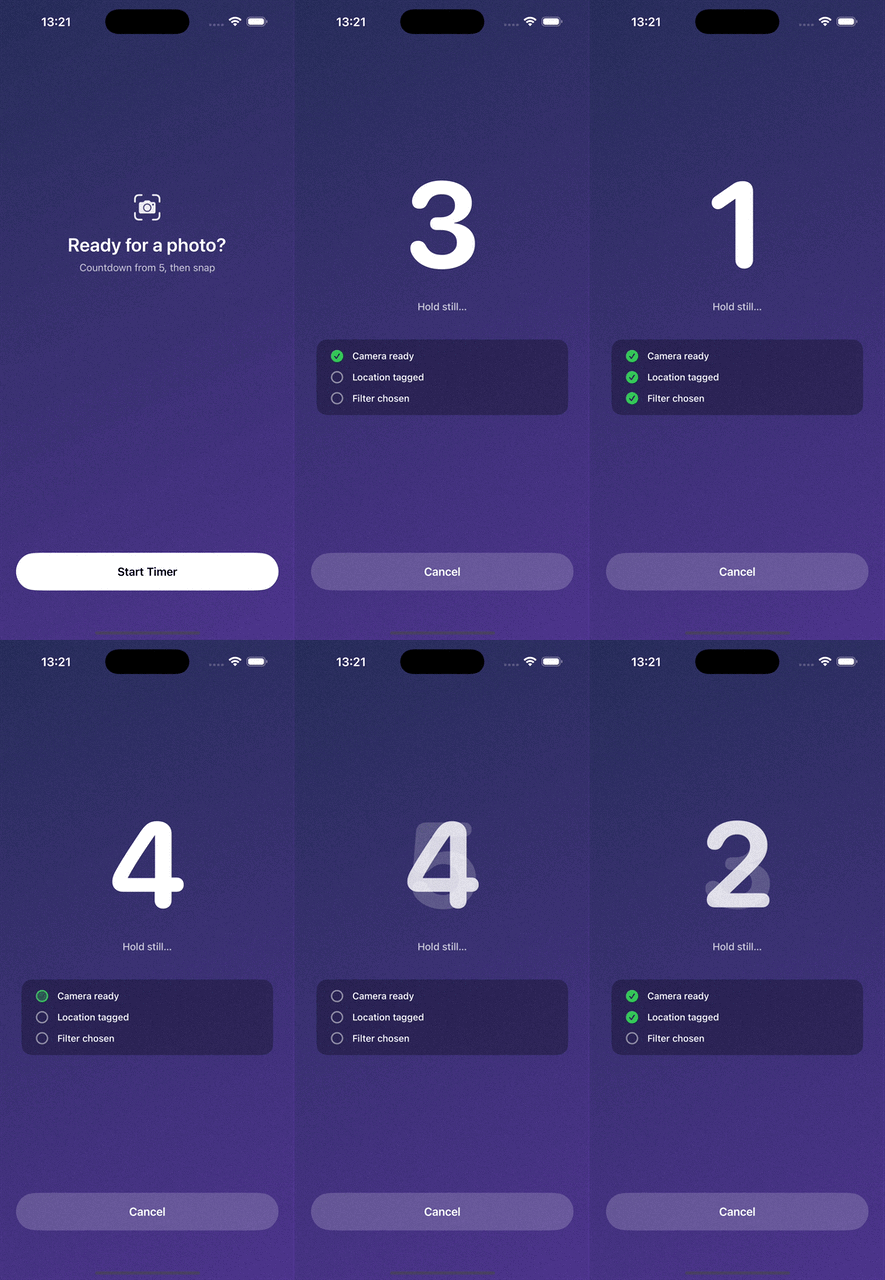
Four child tasks running at once: the visible countdown, plus camera prep, location fetch, and filter suggestion — each ticking on as it lands.
Full source on GitHub: Olya-Yer/async-countdown.
What runs, and when
The user sees the countdown tick from 5 to 1. Behind it, three things are happening in parallel. Each returns a typed value that the final "captured photo" screen wants to display:
struct CameraSettings: Equatable {
    let aperture: String       // "f/2.8"
    let shutterSpeed: String   // "1/60s"
    let iso: Int               // 400
}

struct LocationTag: Equatable {
    let name: String           // "Golden Gate Park"
}

// filter suggestion is just a String: "Vivid"
Sequentially it takes about nine seconds of wall clock. Concurrently it fits inside the five the user is already waiting through.
async let: fork and join
The whole workflow is one method:
private func run() async {
    prep = Prep()
    status = .counting(remaining: countdownSeconds)

    async let countdown: Void            = runCountdown()
    async let settings:  CameraSettings  = prepareCamera()
    async let location:  LocationTag     = fetchLocation()
    async let filter:    String          = suggestFilter()

    do {
        let (_, cameraSettings, locationTag, filterName) =
            try await (countdown, settings, location, filter)

        status = .captured(CapturedPhoto(
            settings: cameraSettings,
            location: locationTag,
            filter: filterName
        ))
    } catch is CancellationError {
        prep = Prep()
        status = .idle
    } catch {
        prep = Prep()
        status = .idle
    }
}
Each async let starts a child task. They run concurrently under the same
parent (this method's own Task). The try await (a, b, c, d) line
suspends until all four have finished, then hands you back a tuple of
their return values. Tuple destructuring gives them their names.
You get three properties out of this for free:
- Fork-join without bookkeeping. No manual
TaskGroup, no completion counters. The compiler enforces that everyasync letgets awaited. - Cancellation propagates. If the enclosing Task is cancelled, all
four children are cancelled. Each one throws
CancellationErrorfrom itsTask.sleep, thetry awaitre-throws, and we land in the catch. - Errors compose. If any child throws, the whole tuple await unwinds — you don't have to inspect individual results to decide whether the workflow failed.
The children themselves are unremarkable:
private func runCountdown() async throws {
    for value in stride(from: countdownSeconds, through: 1, by: -1) {
        status = .counting(remaining: value)
        try await Task.sleep(for: .seconds(1))
    }
}

private func prepareCamera() async throws -> CameraSettings {
    try await Task.sleep(for: .seconds(1.4))
    prep.cameraReady = true
    return CameraSettings(aperture: "f/2.8", shutterSpeed: "1/60s", iso: 400)
}

private func fetchLocation() async throws -> LocationTag {
    try await Task.sleep(for: .seconds(2.8))
    prep.locationTagged = true
    return LocationTag(name: "Golden Gate Park")
}

private func suggestFilter() async throws -> String {
    try await Task.sleep(for: .seconds(4.2))
    prep.filterChosen = true
    return "Vivid"
}
Task.sleep(for:) is a placeholder for a network call or an
AVCaptureDevice handshake — the shape is what matters. What isn't
placeholder is that each one returns something. The countdown returns
Void, but the other three return real data that the caller uses to build
the final CapturedPhoto.
One Task?, one .cancel()
Cancellation lives on the view model as one stored handle:
private var timerTask: Task<Void, Never>?

func startTimer() {
    timerTask?.cancel()          // kill any previous run
    timerTask = Task { [weak self] in
        guard let self else { return }
        await self.run()
    }
}

func cancel() {
    timerTask?.cancel()
}
That's the whole cancellation story. The user taps Cancel; the view calls
vm.cancel(); timerTask?.cancel() runs. Because run() is executing
inside that Task, and the four async let children inherit its cancellation
scope, the very next Task.sleep in any of them throws
CancellationError. The try await (…) re-throws, the do unwinds, the
catch is CancellationError branch fires, prep resets, status goes back to
.idle.
The pattern I keep coming back to: one Task to cancel them all — handled by the enclosing scope, not by every leaf.
The retain-cycle trap
There is one small hazard in the setup above and it's worth naming.
The view model owns timerTask. The Task's closure needs self to call
self.run(). If the closure captures self strongly, you get:
self ──owns──► timerTask ──owns──► closure ──captures──► self
A classic cycle. The view model never deallocates, the Task never deallocates, everything they reference sticks around. In a SwiftUI view model that lives for a screen, that memory eventually goes away when the scene ends — but on the way there you can leak network requests, camera handles, whatever the abandoned Task is still holding.
The [weak self] in guard let self else { return } pair breaks the loop:
timerTask = Task { [weak self] in
    guard let self else { return }
    await self.run()
}
Now the arrow from the closure back to self is weak, so the closure can
outlive self — if the view model deallocates while the countdown is
running, the guard exits and the child tasks are dropped on the floor. In
practice the deinit typically cancels the task first, but the weak capture
is the belt-and-braces version.
@MainActor: thread safety by construction
The whole view model is marked @MainActor:
@MainActor
final class PhotoTimerViewModel: ObservableObject {
    @Published private(set) var status: Status = .idle
    @Published private(set) var prep = Prep()
    // ...
}
That decoration ripples outward in useful ways:
- Every mutation of
statusandprepruns on the main queue. SwiftUI can observe@Publishedand update views without any manual dispatch. Task { }inside a MainActor-isolated context inherits MainActor isolation. So does everyasync letchild. So does everyTask.sleepreturn. Nothing hops off the main queue and then reads@Publishedproperties from the wrong thread.- The returned data types (
CameraSettings,LocationTag) are trivial value types withSendablefields, so they cross the actor boundary of the tuple-await without complaint.
This is the "thread safety" that async/await is actually selling: not
"lockless data structures," but isolation you can read off the class
declaration. If a method is @MainActor and it reads or writes state,
that state is safe. No @property queue, no NSLock, no serial dispatch
queue named com.mycompany.state.
What I'd think about next
A few honest limits of this exact shape:
- All-or-nothing. If any of the three data-fetching tasks throws a
real error (not
CancellationError), the whole workflow unwinds and we reset to idle. That's fine for the demo, but in a real app you might want to say "shoot the photo anyway, mark location as unknown" — which means catching individual errors from individualasync lets instead of tuple-awaiting.Resultinside each child, or per-childtry? await settings, both work. Task.sleepis not a metronome. Each 1-second tick can drift by a few tens of milliseconds. For a visible countdown nobody notices; for something that has to align with a video frame, you'd want a proper clock (ContinuousClockdeadlines or anAsyncSequencedriven byCADisplayLink).ObservableObjectand@Publishedare the old-school pair. Under iOS 17+ the@Observablemacro is nicer and removes the need forCombinealtogether. This demo stuck withObservableObjectbecause it still ships in most real projects and it's what most posts still show.
Why I keep coming back to this shape
The reason async let and one stored Task? feel so tidy is the same
reason the sticky-headers pattern in an earlier
post did: the invariant is small and
easy to name. Here it's everything downstream of this Task is
cancellable in one call. Once that's true, the rest — parallel execution,
gathered return values, main-thread safety, no cycles — falls out of
patterns Swift already gives you.
Code: Olya-Yer/async-countdown
on GitHub — the whole workflow is under 150 lines in
PhotoTimerViewModel.swift.